

make apply.
If you are ready to install, start with the deployment walkthrough.
Platform layers
LangSmith on Azure deploys in stages. Each stage adds a capability layer on top of the previous. All layers share the same AKS cluster andlangsmith namespace.
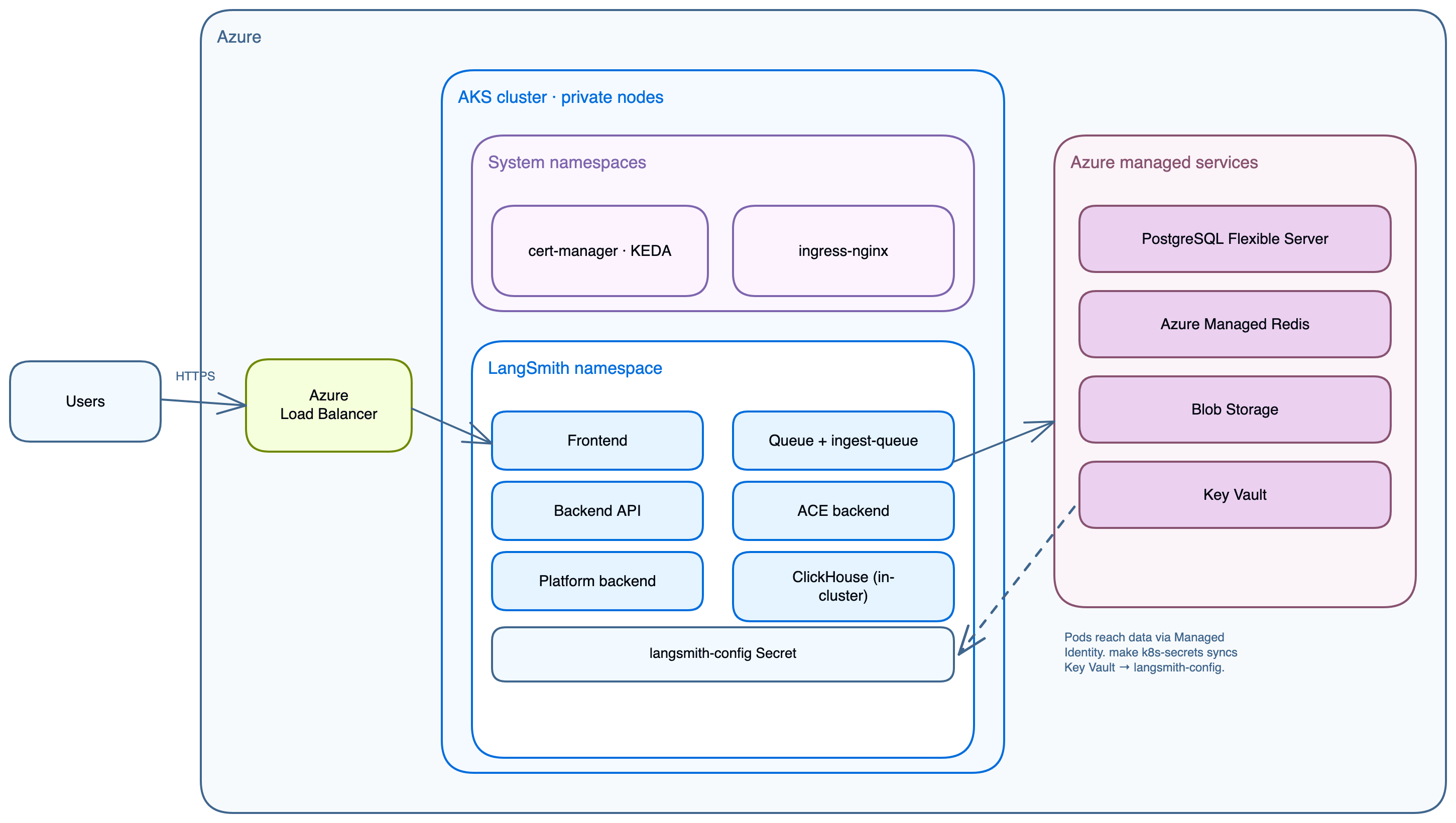
Terraform provisions the infrastructure layer with
make apply. The application and add-on layers deploy through Helm with make init-values and make deploy.
Deployment tiers
Each tier starts from a template ininfra/, and each template sets the matching sizing_profile:
Light deploy (all in-cluster)
terraform.tfvars.minimum sets:
Production (external managed services)
Networking
Light deploy
The VNet is namedls-vnet-<name_prefix> when unique_resource_names = true, which every template sets. Each subnet name starts with the VNet name.
Production
subnet-postgres when enable_smithdb = true, subnet-bastion when create_bastion = true, and subnet-agic when ingress_controller = "agic". It creates the bastion and AGIC subnets only in a VNet it creates; with create_vnet = false, supply bastion_subnet_id and agic_subnet_id. Network security groups attach to the subnets only when enable_subnet_nsgs = true.
AKS nodes get no public IPs. By default, they egress through an outbound public IP on the AKS-managed load balancer. To send egress through your own firewall or a NAT gateway, supply the AKS subnet and set aks_outbound_type (see Networking variables). The module README’s “Egress through your network” section lists the destinations the egress path must allow. The AKS API server is publicly reachable unless you restrict it with aks_authorized_ip_ranges or make it private with aks_private_cluster_enabled. Postgres and Redis have no public endpoints; both are accessible only from within the VNet via private DNS resolution. Terraform creates the private DNS zones in the deployment resource group and links them to the VNet. In a hub-and-spoke network, supply the central zones with postgres_private_dns_zone_id, storage_private_dns_zone_id, and keyvault_private_dns_zone_id, and the zones’ owner links them.
Application core services
SmithDB is LangSmith’s purpose-built observability backend, available for self-hosted LangSmith starting with version 0.16.0 (see self-hosted support). These Terraform modules provision ClickHouse by default, so the guidance in the previous sections applies to most deployments. Set
enable_smithdb = true to add the SmithDB infrastructure: a dedicated PostgreSQL 18 metastore, a storage account and Blob container, Workload Identity, and Premium SSD v2 cache volumes. On Azure, SmithDB requires a stable release on the LangSmith Helm chart 0.17 line, which the v0.17.* module tags deploy. On the v0.16.* line, SmithDB needs module tag v0.16.56 or later and langsmith_helm_chart_version = "~0.17.0".One-time jobs
LangSmith Deployment add-on
Fleet add-on
Fleet replaces the legacy Agent Builder add-on. Setenable_fleet = true, which requires enable_deployments = true and postgres_source = "external". enable_fleet and enable_agent_builder are mutually exclusive.
Fleet stores its data in a dedicated
langsmith_fleet database on the Azure PostgreSQL server. Terraform creates the database and the langsmith-fleet-postgres Kubernetes secret.
Insights and Polly add-on
Insights: Runs as staticstandalone-insights api-server and queue pods. Reads insights_encryption_key from langsmith-config-secret. Never rotate this key: it permanently breaks existing Insights data.
Polly: Runs as static standalone-polly api-server and queue pods, and needs enable_deployments = true. Reads polly_encryption_key from langsmith-config-secret. Same rotation warning as Insights.
Azure managed services
Whenpostgres_source = "external" and redis_source = "external" (the recommended production setting), Terraform provisions:
Azure DB for PostgreSQL Flexible Server
- Holds orgs, users, projects, API keys, settings.
- PostgreSQL 14 or later required.
postgres_versiondefaults to16. - Extensions enabled automatically by the
postgresmodule:btree_gin,btree_gist,pgcrypto,citext,pg_trgm,ltree. - Private VNet only (
subnet-postgres), SSL port 5432. - Secret:
langsmith-postgres-secret, created by thek8s-bootstrapTerraform module.
Azure Managed Redis
- Trace ingestion queue, pub/sub, short-lived cache.
- Azure Managed Redis manages the engine version; there is no version variable to set.
- Each LangSmith installation must use its own dedicated Redis. Shared instances cause deployment tasks to route incorrectly.
- Private VNet only (
subnet-redis), TLS port 10000. - Secret:
langsmith-redis-secret, created by thek8s-bootstrapTerraform module.
Azure Blob Storage
- Trace payloads: large inputs and outputs, attachments.
- Workload Identity (no static keys) via the
k8s-app-identityManaged Identity. - Always required. Disabling blob storage breaks the cluster on large payloads.
- Prefixes:
ttl_s/(14-day TTL),ttl_l/(400-day TTL).
Azure Key Vault
- Centralized secret store for all LangSmith secrets.
- Public endpoint behind the vault firewall by default.
keyvault_private_endpoint_enabled = truemoves the vault to a Private Endpoint and turns public access off, so Terraform and the secret scripts must run from inside the network. - Secret flow:
make seed-secretswrites the app secrets to Key Vault, thenmake k8s-secretsbuildslangsmith-config-secretfrom them. See Secret flow.
Workload Identity
Microsoft Entra ID token exchange happens via the AKS OIDC issuer. Pods access Blob Storage without static keys. Workload Identity is centralized ininfra/modules/k8s-cluster/ alongside the managed identity and OIDC issuer, which avoids circular dependencies and simplifies adding new ServiceAccounts.
Which pods need Workload Identity
Every pod that reads blob storage env vars must have:- A federated credential registered in Terraform (
infra/modules/k8s-cluster/main.tf). - The
azure.workload.identity/use: "true"label on the Deployment. - The
azure.workload.identity/client-idannotation on the ServiceAccount.
All federated credentials are registered in
infra/modules/k8s-cluster/main.tf under service_accounts_for_workload_identity. Each name is <release>-<component>, where <release> is the chart fullname (langsmith by default). Terraform registers the two LLM Gateway credentials whether or not enable_llm_gateway is set. The v0.16.* module tags register all except the two LLM Gateway credentials. SmithDB uses its own ServiceAccount and identity. Adding a new pod that accesses blob storage requires adding its ServiceAccount name to that list and running make apply.
If a pod’s ServiceAccount has no registered federated credential, Microsoft Entra ID rejects the token exchange and the pod panics on startup:
Secret flow
The secrets flow runs in this order.make deploy-all runs steps 2 through 5, and make apply runs make setup-env first when secrets.auto.tfvars is missing:
make setup-envwritessecrets.auto.tfvars, which is gitignored and read by Terraform automatically. It prompts for the PostgreSQL admin password, the license key, and the initial org admin email. SetLANGSMITH_PG_PASSWORD,LANGSMITH_LICENSE_KEY, andLANGSMITH_ADMIN_EMAILto skip the prompts. It never writes to Key Vault.make applycreates Key Vault. Terraform writes onlypostgres-admin-passwordandlangsmith-license-keyto it, and only whenkeyvault_manage_secrets = true(the default). Thek8s-bootstrapmodule createslangsmith-license, pluslangsmith-postgres-secretandlangsmith-redis-secretfor external Postgres and Redis.make seed-secretswrites the app secrets straight to Key Vault: the admin password (prompted, orLANGSMITH_ADMIN_PASSWORD), the API key salt, the JWT secret, and four Fernet encryption keys. Withkeyvault_manage_secrets = false, it also writes the two secrets Terraform skipped.make kubeconfigfetches the AKS credentials.make k8s-secretsthen reads Key Vault and createslangsmith-config-secretwith all eight keys, plusoauth_client_id,oauth_client_secret, andoauth_issuer_urlwhen thelangsmith-oauth-*secrets exist in Key Vault.make init-valuesandmake deployinstall the chart withconfig.existingSecretName = "langsmith-config-secret". No secret appears inline in any values file.
secrets.auto.tfvars is never committed. Re-run make setup-env on any machine to restore it. The app secrets never pass through Terraform state. make seed-secrets never overwrites an existing secret, because a new API key salt, JWT secret, or Fernet key breaks a running deployment. Rotate a secret deliberately with make keyvault.
Ingress options
Azure Public IP DNS labels (
dns_label) work with every controller except none. For nginx, istio, and istio-addon, deploy.sh applies the service.beta.kubernetes.io/azure-dns-label-name annotation to the controller’s LoadBalancer service. For envoy-gateway, the EnvoyProxy resource carries the label. For agic, Terraform sets the label on the Application Gateway public IP.
For the full TLS compatibility matrix and per-controller setup, see INGRESS_CONTROLLERS.md in the Azure module repo.
Resource sizing
Four sizing profiles are available.AKS node pools
ClickHouse (when in-cluster) requests 1 to 4 CPU and 2 to 16 GB RAM depending on profile. With LangChain Managed ClickHouse, the
large pool is only needed for agent pods that the LangSmith Deployment operator spawns.Optional modules
Each module is count-controlled (0 disabled, 1 enabled). Enable any combination; the core deployment works without them.
Connect these docs to your agent of choice via MCP for real-time answers.